Cool Network Icon for Dia
September, 03 2011. 3 minutes read.
Yeah…, using default dia , it’ not enough for creating cool presentation abaout networking, yeah we need another icon. We can download it from here . Ok let do this.
1. Install Dia (if you never installed it):
$ sudo apt-get install dia
2. Copy your icon that you already download from here, to /usr/share/dia/
$ sudo cp /home/your-user/Downloads/rib-network-v0.1.tar.gz /usr/share/dia/
3. Go to directory /usr/share/dia/ :
$ sudo cd /usr/share/dia/
4. Extract your icon
$ sudo tar zxvf rib-network-v0.1.tar.gz
5. Open your dia.
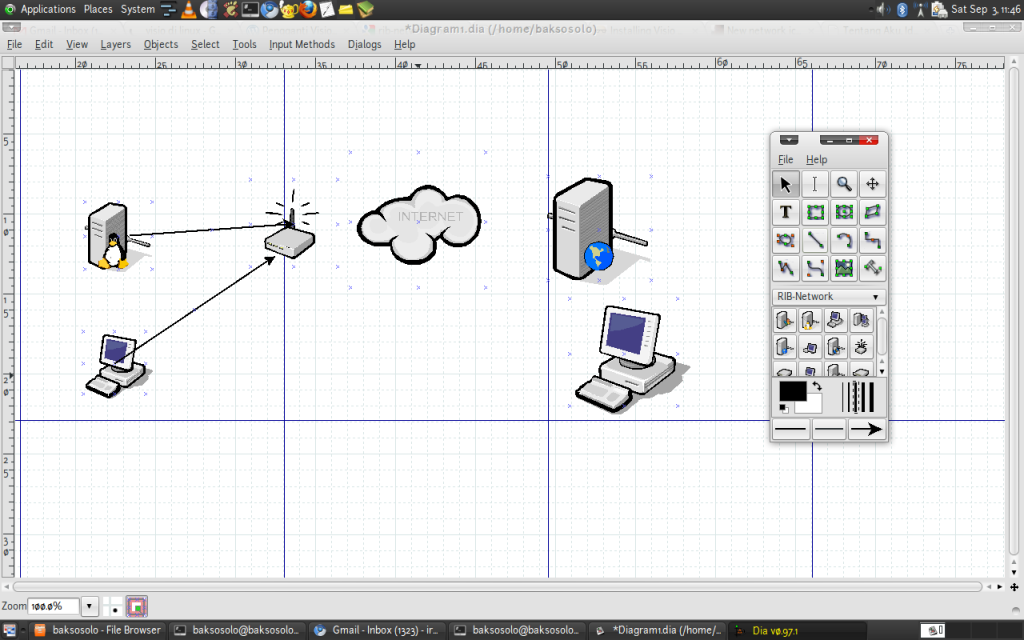
6. Pick icon via “Other Sheet” –> “RIB-Network” then tarra, this the result:
Other links:
http://gnomediaicons.sourceforge.net/download.html
Originally published at: https://xunilresu.wordpress.com/2011/09/03/cool-network-icon-for-dia/