Lecturer Based Supportive Tool Development and Approaches for Learning Material Sharing under Bandwidth Limitation
Authors: Irwan Alnarus Kautsar¹†, Shinichiro Kubota², Yasuo Musashi¹, Kenichi Sugitani¹
¹ Kumamoto University, Kumamoto, Japan
² University of Miyazaki, Miyazaki, Japan
† Presently with Universitas Muhammadiyah Sidoarjo, Indonesia
Published in: Journal of Information Processing (IPSJ), Vol. 24, No. 2, pp. 358–369 (March 2016)
DOI: 10.2197/ipsjjip.24.358
Type: Regular Paper
Link: https://www.jstage.jst.go.jp/article/ipsjjip/24/2/24_358/_article
Abstract
Currently, lecturers have been offered various LMS's. The Learning Management System (LMS) could provide high quality, rich and complete materials in Higher Education Institution (HEI) that use LMS as part of academic activities. In those activities, lecturers are the key persons responsible for enriching learning materials. Therefore, it is common sense that lecturers need to be supported for enriching learning materials in any condition, whether online or offline.
There are several options for a lecturer when he needs to use an LMS: use the LMS directly (access to the LMS server) or implement it on a local machine as a local server. The use of LMS as a server application brings many issues like installation, configuration, learning materials authoring, LMS operation, etc. In this particular case, we focus on the Indonesian educational environment, where a highly motivated lecturer is eager to use LMS to deliver lectures but is restricted to use a limited bandwidth.
The present paper discusses a supportive tool to support offline authoring and delivery methodology development in existing LMS or even HEI with no LMS installed, considering all the issues related to LMS and the limited bandwidth environment. As a result, we developed a Lecture Based Supportive Tool (LBST) as an approach to enable a lecturer to create learning materials in offline conditions and/or limited bandwidth, then upload it on a remote LMS to share and enrich learning materials.
Keywords: LMS, lecturer based supportive tool, offline authoring, bandwidth limitations
1. Introduction
Lecturers are the key persons to ensure knowledge transfer from the literature to the student. Using a Learning Management System (LMS), a lecturer could provide learning material accessible anytime and anywhere by a student using internet connections [1], [2].
Without a reliable internet connection in developing countries like Indonesia, the use of LMS to enrich learning materials remains ineffective [5]. The download index from Netindex.com located Indonesia in the 142nd position worldwide, and according to Akamai, the average Internet connection speed in Indonesia was 2.4 Mbps (93rd position worldwide) [6], [7].
Table 1. Bandwidth evaluation between Indonesia and Japan (September 2013)
Bandwidth limitations, well known in the "Bandwidth Gap," bring difficulties to using LMS since lecturers require an Internet connection to create learning material [5], [8], [9].
A common solution is installing the desired LMS on a local machine. But lecturers need to learn how to install and configure the chosen LMS, which makes many leave the LMS behind. On the other hand, a lecturer possibly teaches in more than one university (implied by the Indonesian Government's MP3EI regulation [10], [11]). Since there is no regulation yet on what LMS should be implemented, different HEIs could use different LMS's, obliging lecturers to adapt their content and skills to different LMSs, generating non-academic overwork [12].
This paper presents the development of a supportive tool designed based on lecturer needs and discusses a portability approach suitable for the Indonesian education environment.
2. Related Work for Learning Material Sharing under Bandwidth Limitation
2.1 Offline Method for Distance Learning
Johnson et al. proposed the use of File Transfer Protocol (FTP) combined with information stored on a Compact Disk (CD) for distance learning in online and offline environments [13]. It is suitable for limited bandwidth, but requires complex FTP server configurations.
2.2 Learning Object Sharing Peer to Peer (LOP2P)
Rafael & Andre (2010) distribute free learning material based on Peer to Peer (P2P) mechanism [14], powered by a plugin installed on a university LMS that communicates with a "Mediation Layer." However, this plugin is limited to a specific Moodle LMS version.
2.3 Unidirectional Synchronizations
Roy et al. proposed a novel method to solve the lack of learning materials shared from an experienced HEI to a new HEI, by making the mature Moodle LMS the Master and the young LMS the Slave [5]. Still, it requires mandatory internet access and is limited to a specific Moodle version (Moodle 1.9).
The similarity of these three works: they lack a solution for pre-existing conditions where lecturers have different courses in several HEIs with a variety of installed LMSs. Rafael et al. and Roy et al. assume the lecturer will use the same LMS (Moodle).
3. Problem Analysis and Proposed Method
3.1 Offline Authoring and Its Problem
The research question: "How could the authoring process work and store enriched materials in an offline environment or where there is no internet connection?"
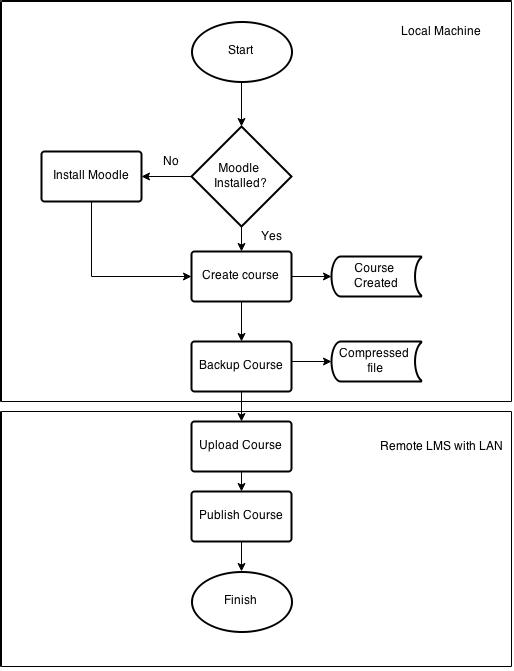 Fig. 1. Lecturer's basic activities while using Moodle
Under normal conditions, web-based applications like LMS are deployed on a server. To use Moodle offline, a local installation is required, needing a Webserver (Apache/Nginx), a database engine (MySQL/PostgreSQL), and configuration of files like php.ini and Moodle config.php. This is not an easy task for lecturers without training.
We draw the lecturer's needs — an application that includes LMS features for learning material authoring, addressing: 1. Enable offline authoring capabilities 2. Easy to use, install, and initiate (no complex configurations) 3. Being able to interoperate with existing LMS to share learning materials
3.2 Existing Approaches to Enrich and Share Learning Material
We address our first question: How can UMSIDA (which implemented Chamilo LMS) enrich learning material from Kumamoto University (which implemented Moodle LMS)?
Moodle and Chamilo both support SCORM, but not the same Quiz/Assessment standard. Moodle has Moodle XML; Chamilo uses IMS QTI. To enable assessment content sharing, we proposed Bridge.xml.
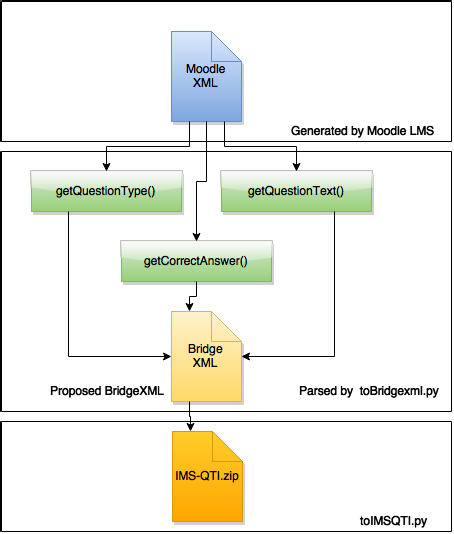 Fig. 2. BridgeXML as an approach for portability assessment between MoodleXML and IMSQTI
4. Development and Implementation
The LBST was developed using the Flask microframework, which includes a built-in WSGI server. Running a single Python script starts the web server and uses a local database — no need to install and configure Apache/Nginx separately. Lecturers author learning material offline, then upload/synchronize to a remote Moodle LMS through Moodle web services (REST) when connected via LAN.
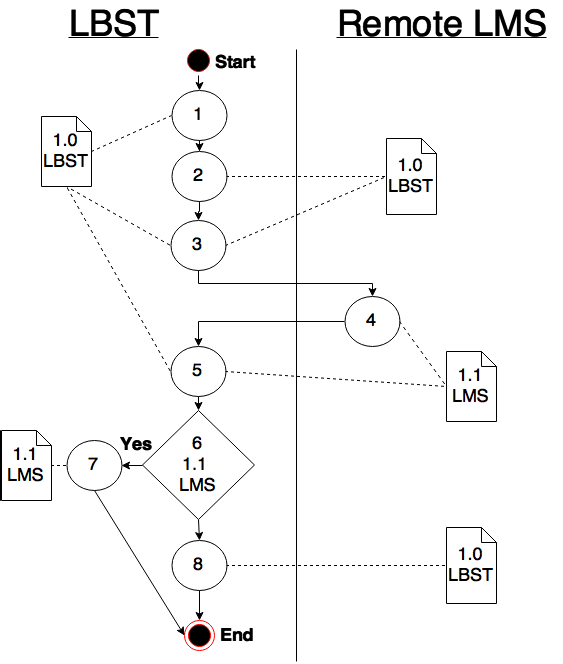 Fig. 3. LBST learning material authoring interface
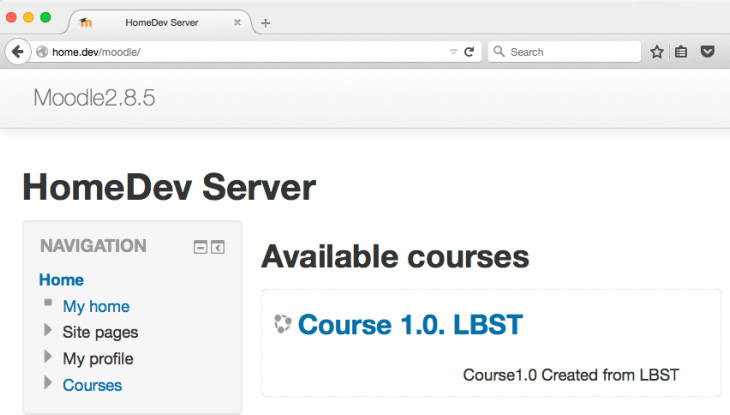 Fig. 4. Synchronization of course content to remote Moodle LMS
5. Experiments and Evaluation
The LBST was evaluated through lecturer and student experiments, comparing the experience of using Moodle vs LBST for creating, modifying, deleting, and syncing courses.
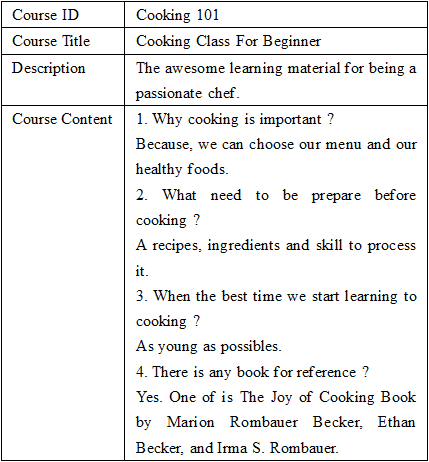 Fig. 5. Network Topology of an LBST Implementation on mini devices
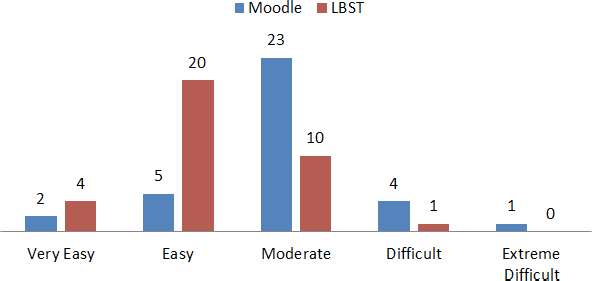 Fig. 6. Mobile view of LBST learning materials
Since LBST was developed with responsive template engines, there is no significant difference in the view from PC and mobile browsers.
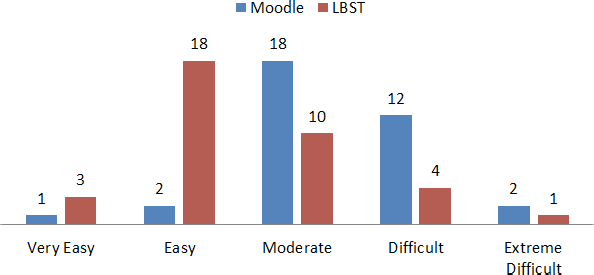 Fig. 7. Lecturers' expression when creating a course in Moodle and LBST
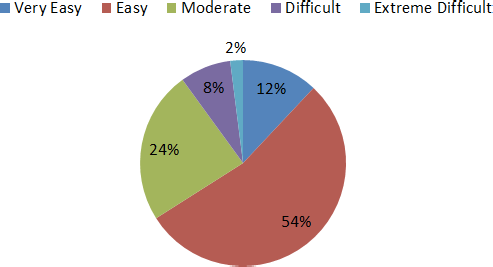 Fig. 8. Lecturers' expressions when uploading and syncing materials to the remote LMS
 Fig. 9. Students' expression using LBST in their class
Key findings: - Lecturers expressed more "easy" and less "difficult" expressions when using LBST compared with Moodle - Uploading activities were simpler than synchronizing (synchronization requires manual comparison of created material) - More than 50% of students reported "easy" expressions while accessing materials on their own devices
Comments from respondents: - It should open the browser automatically after initiating LBST - Need an "add image" feature to the course content - It would help to have a collaboration feature such as editing documents - An option for automatic synchronization of learning materials would help
6. Conclusions and Future Works
The developed LBST uses Moodle web services for enhancing and sharing learning materials under bandwidth limitations. It enables lecturers to author learning materials in offline conditions with minimal setup (a single Python script), then upload to a remote LMS regardless of the Moodle version. The tool is portable enough to run on mini devices, supporting lecturers who teach across different universities with different LMS implementations.
Future work includes adding automatic synchronization, collaborative editing features, and an image insertion feature based on respondent feedback.
References
[1], [2] LMS and virtual learning environment references.
[5] Roy et al., Unidirectional synchronization for LMS content sharing under limited bandwidth.
[6], [7] Netindex.com and Akamai internet speed rankings.
[10] K. Nomura, "A perspective on education for sustainable development," International Journal of Education Development, vol. 29, pp. 621–627, 2009.
[11] B. Y. Moeliodihardjo et al., "University, Industry, and Government Partnership: Its Present and Future Challenges in Indonesia," Procedia Social Behaviour Science, vol. 52, pp. 307–316, 2012.
[12] S. Hamid, "Lecturers Performance and Technology at Private Higher Education."
[13] Johnson et al., FTP + CD approach for distance learning.
[14] Rafael and Andre, Learning Object Sharing Peer to Peer (LOP2P), 2010.
[19] Chamilo LMS.
[26] Mini device deployment references.
[27] Responsive template engine references.
[29] Moodle LMS.
(Full reference list available in the version of record.)
This is a preprint (author self-archived) version. The version of record is available at J-STAGE / IPSJ.