A Supportive Tool for Lecturers to Upload LMS Learning Contents Automatically
Authors: Irwan Alnarus Kautsar¹, Shin-Ichiro Kubota², Yasuo Musashi¹, Kenichi Sugitani¹
¹ Graduate School of Science and Technology, Kumamoto University, Japan
² Department of Computer Science and Systems Engineering, Miyazaki University, Japan
Published in: 66th IEEE Fukuoka Section Joint Conference of Electrical and Electronics Engineers in Kyushu International Session (JCEEE-Kyushu) 2013, p. 180. Kumamoto, Japan, September 24-25, 2013
J-STAGE: https://www.jstage.jst.go.jp/article/jceeek/2013/0/2013_180/_article
1. Introduction
Indonesia, with more than 2300 Higher Education Institutions (HEI) and over 1500 Moodle implementations in HEIs, considers the role of the Learning Management System (LMS) important as a learning activity. On the other hand, internet infrastructure in Indonesia is still a matter for adapting LMS as a learning process [1], [2], [3].
Normally, a lecturer creates learning content by accessing the Moodle server through an internet connection. He cannot make and edit learning content if he does not have an internet connection. It is effective for lecturers to develop a supportive tool where lecturers can author their content on any LMS in the offline situation.
This paper investigated the possibility of accessing the Moodle database from our developing web application, and automatically uploading learning content to Moodle.
2. Method for Uploading Learning Content
To enable uploading learning content from outside the Moodle Server, we can use the REST protocol, which is one of the Moodle Web Services and makes it possible to access a Moodle server through a URI (Unified Resource Identifier) with a token provided by the Moodle server [5], [6], [7]. This URI format is a combination of a Moodle server address, token, and REST function call.
Moodle learning content is offered in many formats: Assignment, Chat, Choice, Database, External Tool, Forum, Glossary, Lesson, Quiz, SCORM package, Survey, Wiki, and Workshop. As a first approach, Wiki and SCORM are created with REST.
To make learning content, Moodle stores it across several tables: the course table (mdl_course), the section table (mdl_course_section), and each format's tables. For example, the Wiki format is stored in mdl_wiki, mdl_wiki_subwiki, mdl_wiki_pages; SCORM is stored in mdl_scorm and mdl_scorm_scoes. To create learning content, it is necessary to access these tables.
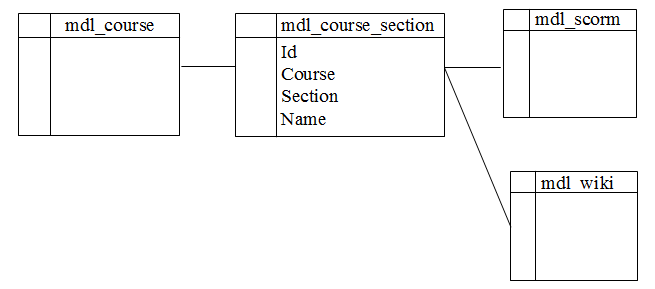 Figure 1. Moodle course tables relationships
For our proposed tool, this paper focused on three functions: 1. Easily create new course/learning content, which the author made in the offline situation 2. Check whether the PC can access the LMS server or not (online situation) 3. Upload new content automatically in the online situation
3. Developments and Results
To implement the three functions, we developed a web application with the Flask framework that enables the lecturer to create a new course in the offline situation as easy as 1-2-3. With the Flask framework [8], based on Python, the lecturer can run the application by executing one Python file, with no configuration activity like when a lecturer installs Moodle on a local machine.
Then we built a script that could check whether the PC can access the LMS server or not.
For the last function (uploading created content), the web application was developed to access the Moodle Web Service with the Moodle REST function call. With the REST function call, it is possible to access the preferred table on the Moodle Database through Moodle Web Services.
In fact, not all REST function calls are available on Moodle. For example, the Moodle REST function call for creating a section and Wiki/SCORM learning format is not yet available. This REST function call is needed because, to create new learning content, it must have the ability to access those three tables (Course, Section, Wiki/SCORM). To enable automatic uploading, our web application accessed the Moodle database without a REST function call.
4. Conclusion
This paper proposes a supportive tool for authors to create learning content in offline or online ways, which fits with the internet infrastructure of Indonesia.
For future work, other problems need to be solved where Moodle doesn't provide a REST function call to support creating complete learning content in Moodle.
References
[1] R. D. Kuntoro et al., JIKM, Vol. 02, 04, 361–374, 2003.
[2] Wicaksono et al., DPU/EABER Bangkok, 2008, 45.
[3] R. M. Ijtihadie et al., HCI, vol. 2, 1, p. 17, Nov. 2012.
[4] P. J. Muñoz-Merino et al., CSI, 31, 2, 484–498, 2009.
[5] F. Orellana et al., 3PGCIC, 103–110, 2012.
[6] J. Webber et al., O'Reilly Media, 2010.
[7] F. Belqasmi et al., IEEE CommMag, 49, 66–73, 2011.
[8] Flask framework. http://flask.pocoo.org/
This is a preprint (author self-archived) version. The version of record is available at J-STAGE.