Synchronizing Learning Material on Moodle and Lecture Based Supportive Tool: The REST Based Approach
Authors: Irwan Alnarus Kautsar¹⁴, Yasuo Musashi¹, Shin-Ichiro Kubota², Kenichi Sugitani¹
¹ Computer Science and Electrical Engineering, Kumamoto University, Japan
² Computer Science and Systems Engineering, University of Miyazaki, Japan
⁴ Universitas Muhammadiyah Sidoarjo, Indonesia
Published in: 2015 International Conference on Information, Communication Technology and System (ICTS), Surabaya, Indonesia
DOI: 10.1109/ICTS.2015.7379896
IEEE: https://ieeexplore.ieee.org/document/7379896/
Abstract
A lecturer's role is the important part for the success of any eLearning platform, including Moodle LMS, because only lecturers enrich learning materials. Unfortunately, Indonesia still faces the bandwidth gap that makes difficulties to use Moodle as a daily basis. Moreover, it will become complex when a lecturer decides to install it on a local machine. This paper presents a supportive tool that not only enriches learning materials in offline conditions with easy initiation steps, but also synchronizes it on remote LMS using Moodle REST web service in order to share learning material in limited bandwidth.
Keywords: synchronization, Moodle, Supportive Tool, REST, Web Service
I. Introduction
Based on DGHE (Directorate General Higher Education of Indonesia), Indonesia has more than 3500 Higher Education Institutions (HEI), 300,000 lecturers and 7.8 million students [1]. With those numerous numbers, the adaptation of Moodle LMS (Learning Management Systems) is urgently needed. More than 600 Moodle sites have been registered in Indonesia [2]. This adaptation does not become a strong point for better education environment in Indonesia, which still faces the bandwidth gap [3]. Because both lecturers and students need an internet connection in order to use Moodle as daily basis [4].
This problem might solve with installing Moodle on a local machine, but the effort to install Moodle on a local machine is complex. It starts with configuring a web server, database, and needs practical skill to create, backup then upload manually on remote Moodle LMS. This complexity will be a burden for lecturers before they start to author learning materials in offline conditions.
The developed Lecturer Based Supportive Tool (LBST) has been proposed to solve the following problems:
- Complexity while using Moodle LMS
- The lack of internet connection when enriching learning material and synchronizing it on remote Moodle LMS
II. Related Work, Moodle Web Services and LBST
A. Related Work
Limited bandwidth always becomes an issue when implementing LMS. The main factor for successful LMS adaptation in the learning process is to enrich learning materials. While there is a bandwidth limitation, it will limit the lecturer to enrich the learning materials.
- Johnson et al. propose the use of File Transfer Protocol (FTP) and Compact Disk (CD) as part of distance learning [5]. Share learning material online using FTP and offline using CD. But these implementations need complex handling due to FTP server configuration.
- Rafael & Andre (2010) have an approach to enrich learning material by distributing free learning material based on Peer to Peer (P2P) mechanism, empowered by developing a Moodle plugin [6]. It works as a mediation layer, but needs advance configuration skill.
- Roy et al. proposed a novel method called dynamic synchronization [7]. The aim is to solve lack of learning material between mature and young HEI. But this approach only works on Moodle-to-Moodle systems and is mandatory to apply on the same Moodle versions, which will quickly become obsolete.
Those three approaches have a similar goal (addressing learning material sharing on limited bandwidth) but do not address the conditions of the lecturer itself. None of those approaches make use of the advance Moodle feature such as Moodle web services.
B. Moodle Web Services
Moodle provides web services that enable third party application access to learning material with a single URL instead of regular authentication such as user and passwords [12]. For example, if the third party application needs to get information of some course on remote Moodle, it could use the function call named core_course_get_course, combined with a token and needed options into an appropriate URL.
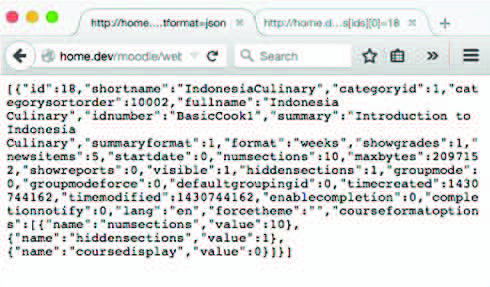 Fig. 1. Response from Moodle Web Services
The Moodle web services function call has a similar function with CRUD (Create Read Update Delete) on created learning materials on Moodle. These features made it possible to develop third party applications and interact with Moodle resources through its web services.
C. Lecturer Based Supportive Tools (LBST)
Web application does not burden users on specific platform and device. Mostly LMS users are lecturers and students, especially a lecturer whom responsible to enrich learning content. This is why we develop a supportive tool based on what lecturers need, not what lecturers should adapt when they want to use Moodle in offline conditions.
Our current development supportive tool named LBST is developed with Flask web framework [8]. Flask framework has built-in Web Server Gateway Interfaces (WSGI) [9] library named werkzeug [10] and Jinja templating [11]. This means, once users run the application, it automatically runs the web server and uses the local database that is already provided. After running the script, lecturer could directly author learning material in offline condition and upload it on remote LMS when connected to campus LMS through LAN.
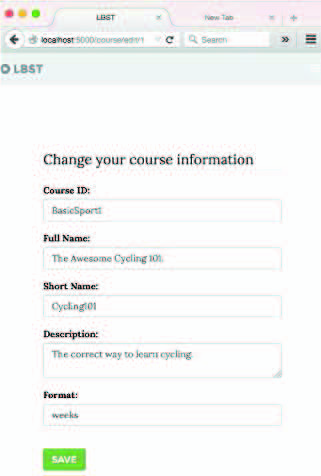 Fig. 2. Life cycle of user activity when use the LBST
The life cycle lecturer activity on LBST: 1. Lecturer needs to run a single python script to initiate the LBST 2. Lecturer accesses LBST through browser apps and creates learning material 3. Lecturer uploads learning materials 4. Course uploaded on remote LMS
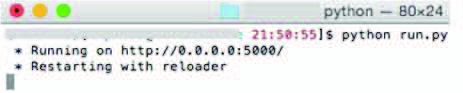 Fig. 3. LBST initiation
In order to know which server the learning material will be uploaded to, the lecturer needs to do small configuration on the LBST. It needs address of remote LMS and token provided by remote Moodle LMS.
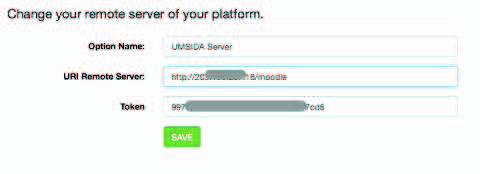 Fig. 4. Setting up a Remote server on LBST
III. Moodle REST Web Service Synchronization
We propose to use Moodle web services for synchronization, because it is standardized and covers almost all Moodle release versions. The web services protocol provided by Moodle is REST (Representational State Transfer), xml-rpc, and SOAP [12].
In this research, REST protocol was selected. REST concepts assume all Moodle learning materials are resources. With these concepts, consumer application like LBST has no need to deal with Moodle database relationships. These bring advantages for developers to focus more on developing supportive tools.
The need of synchronization between LBST and remote Moodle is how to perform REST action: PUT, GET, POST on Moodle resource through Moodle web services.
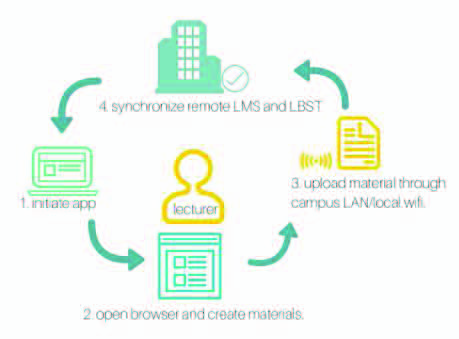 Fig. 5. REST action and Moodle REST function call
Moodle will give different responses according to what request has been made. The synchronization process maps REST actions to appropriate Moodle web service function calls, allowing the LBST to push locally-authored content to the remote Moodle LMS.
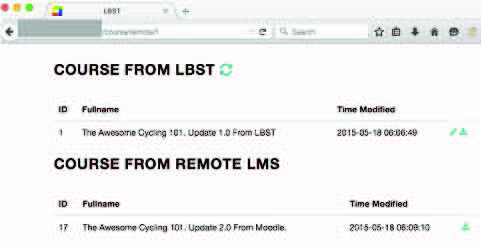 Fig. 6. Synchronization flow
IV. Implementation
The LBST was implemented and tested against a remote Moodle LMS. The synchronization process was verified by creating learning material offline on the LBST, then synchronizing it to the remote Moodle when a connection became available.
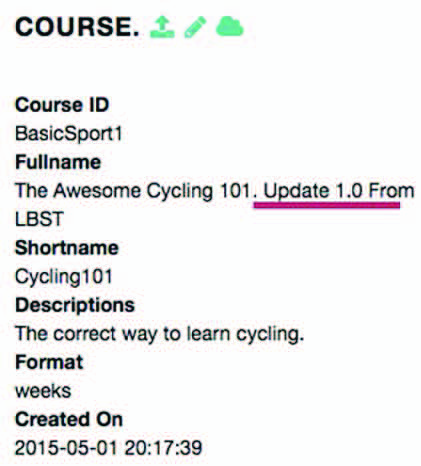 Fig. 7. LBST learning material authoring interface
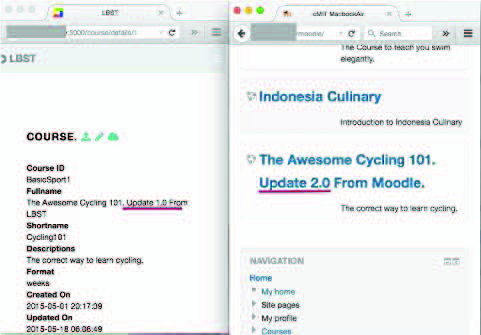 Fig. 8. Synchronized content on remote Moodle LMS
The implementation demonstrated that lecturers can author learning materials in offline conditions with minimal setup (running a single Python script), and synchronize them to any compatible Moodle version through the standardized REST web services.
V. Conclusion and Future Works
This paper presented a Lecturer Based Supportive Tool (LBST) that solves two key problems faced by Indonesian lecturers: the complexity of using Moodle LMS and the lack of reliable internet connection. By using the Flask web framework with built-in WSGI server, lecturers can run the LBST locally with a single script and author learning materials offline.
The REST-based synchronization approach using Moodle web services allows the LBST to work across different Moodle versions, avoiding the version-lock limitation of previous Moodle-to-Moodle synchronization methods. This makes learning material sharing feasible even under limited bandwidth conditions.
Future work includes extending the synchronization to support more Moodle resource types and improving conflict resolution when content is modified on both the LBST and the remote Moodle.
Acknowledgment
The authors thank Kumamoto University and Universitas Muhammadiyah Sidoarjo for supporting this research.
References
[1] Directorate General Higher Education of Indonesia (DGHE) statistics.
[2] Moodle registered sites statistics, Indonesia.
[3] Bandwidth gap studies in Indonesian higher education.
[4] Studies on internet connectivity requirements for Moodle LMS.
[5] Johnson et al., "File Transfer Protocol and Compact Disk approach for distance learning."
[6] Rafael and Andre, "Peer-to-peer mechanism for distributing free learning material via Moodle plugin," 2010.
[7] Roy et al., "Dynamic synchronization method for Moodle content sharing."
[8] Flask web framework. https://flask.palletsprojects.com/
[9] Web Server Gateway Interface (WSGI) specification.
[10] Werkzeug WSGI library.
[11] Jinja templating engine.
[12] Moodle Web Services documentation. https://docs.moodle.org/dev/Web_services
[13] I. A. Kautsar et al., prior work on Lecturer Based Supportive Tool.
This is a preprint version. The final published version is available at IEEE Xplore.